Real-time Earthquake Feed
Live data from USGS, EMSC, JMA, ISC, and more with magnitude filtering, auto-refresh, and interactive maps.
 GWN
Global Earth Monitor
GWN
Global Earth Monitor
GWN — Global Earth Monitor is a desktop application that fuses live earthquake, fireball, asteroid, volcano, atmosphere, and space weather feeds into one window. Built on Electron, Leaflet, and real public data from USGS, NASA, EMSC, and dozens of FDSN stations.
Ten live data layers, an interactive 3D solar system, real seismic waveforms, and a statistics workspace — all without leaving the app.
Live data from USGS, EMSC, JMA, ISC, and more with magnitude filtering, auto-refresh, and interactive maps.
NASA fireball and bolide event overlays plotted alongside other planetary activity.
Near-Earth asteroid data from NASA JPL — close-approach details and Pan-STARRS sky imagery.
Pan-STARRS DR2 sky survey browser with 3 billion objects, color composites, and deep-sky presets.
Interactive asteroid orbits powered by Asterank, MPC, and Kepler data.
Live volcano alerts and eruption data from the Smithsonian Global Volcanism Program.
Weather overlays, SO₂, UV Aerosol Index, thermal anomalies, and space weather from NOAA SWPC.
Seismic prediction tools and an analysis workspace for deeper review.
Browse global seismograph networks, select stations, and view live MiniSEED waveforms with audio feedback.
Filter and compare earthquake feeds by source, magnitude, depth, and cadence.
Station waveform panel collapses to a slim bar so the map keeps the spotlight, and expands back without losing your session.
Capture observations, link to the data you're seeing, and keep them across sessions in a dedicated Notes tab.
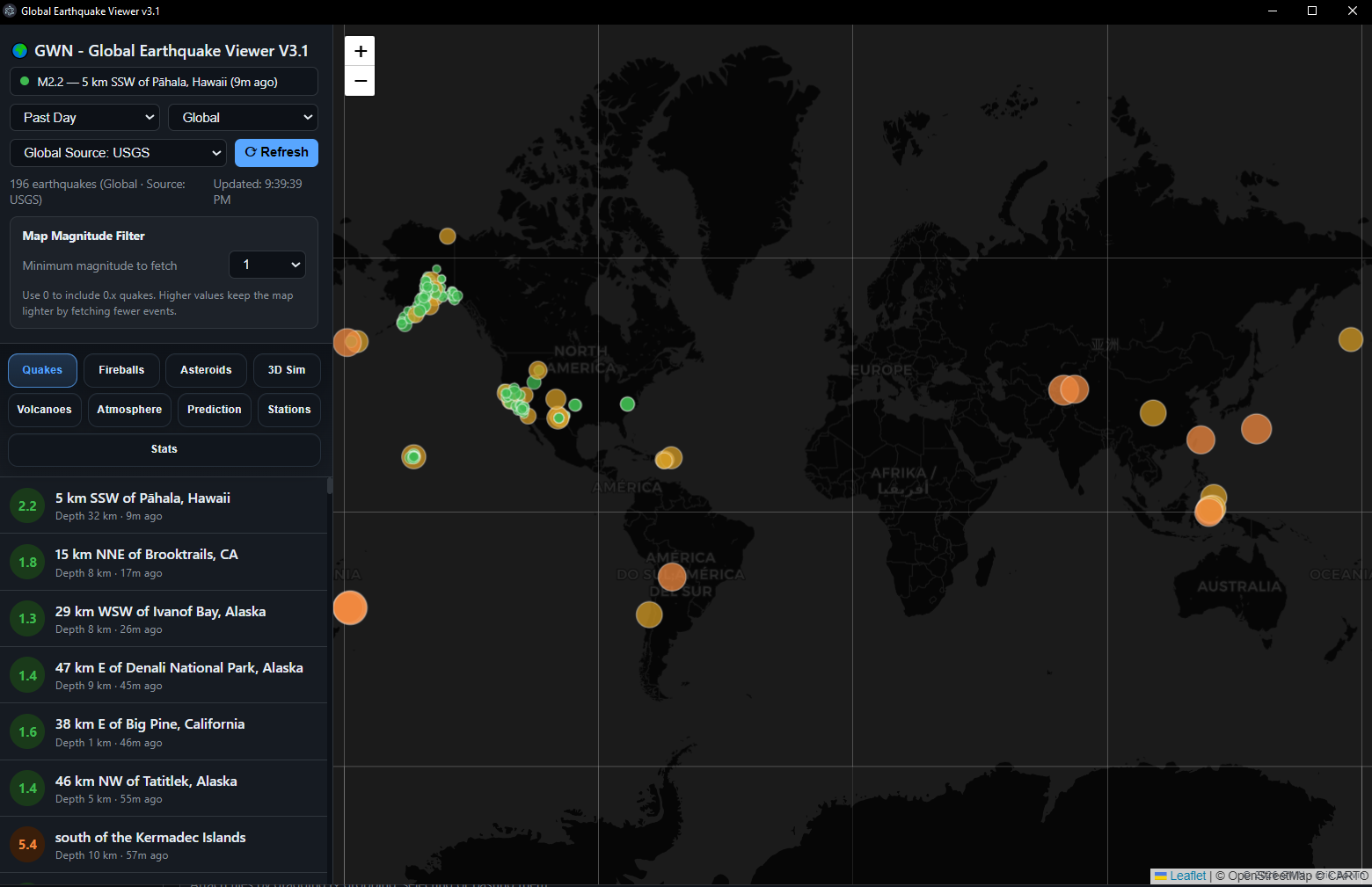
Earthquakes, magnitudes, and depth — all colour-coded and refreshable from the side panel.
Either grab the Windows installer from GitHub Releases, or run a one-line command in PowerShell. Both end up with the same app in your Start menu.
Grab the latest signed Windows installer from the Releases page. It's a normal NSIS setup — picks an install folder, drops Start menu and desktop shortcuts, registers an uninstaller in Apps & features.
GWN-Setup-<version>.exeFrom PowerShell, this downloads install.ps1 from the main branch and runs it. The script fetches the same Windows setup and launches it. Works from PowerShell, Run dialog, or Command Prompt.
irm https://raw.githubusercontent.com/tattooinmtl/GWN-GlobalEarthMonitor/main/install.ps1 | iexpowershell -NoProfile -ExecutionPolicy Bypass -Command "irm https://raw.githubusercontent.com/tattooinmtl/GWN-GlobalEarthMonitor/main/install.ps1 | iex"To build from source instead of using the published setup, run with $env:GWN_INSTALL_MODE = 'source' in front of the same command (requires Node.js 18+).
GWN pulls only from public, authoritative data providers. No scraping, no API keys, no paywalls.
Vanilla JavaScript, no SPA framework dependency, just the tools that earn their place.